Train Schedule Display
public transportation lovers wya!!
Here’s my process-ramble / semi-tutorial on a SF MUNI and Caltrain schedule display! Spoiler: this project functions but is still a WIP. My general inspiration was the schedule displays at train/bus stops as decor. I was also motivated by the fact that my morning commute varied wildly depending on bus delays… I had multiple routes to get to work and every morning I’d have to check transit multiple times to see when I’d have to leave and which bus had the best transfer. Annoying! Thus, train schedule display: two birds fixed with one API request!
Hardware
There were a lot of LED displays that I looked at, but I ended up ordering an Adafruit MatrixPortal kit to save myself some time on misc. hardware issues and soldering time. There are some cons to this that I’ll get into later- but overall the convenience got me started on the project much sooner than if I had to do all the wiring by myself.
Code
This was baby’s first API request foray!! I used 511 Open Data to make my API calls. I believe this is what literally everyone uses, even SFMTA, and you can get a free API token to make 60 requests per 3600 seconds (AKA 1 call every minute). The data exchange protocol is documented pretty well here.
I decided to code on the MatrixPortal with CircuitPython since I’ve been doing much more in Python than C++ lately. I spent a while just figuring out the basics of API requesting and parsing JSON into what I needed in VS Code. I ended up writing a wrapper function to make API requests for specific transit agency / stop IDs.
There were some difficulties transferring my code onto the MatrixPortal… I had never used CircuitPython before and didn’t realize how restrictive it was. The first major problem was that the 511 API gave me data with a SIRI format that freaked out typical JSON unpackers. The way I had been parsing it on my computer didn’t work on the M4 processor, but I did manage to find a workaround that was slightly bulkier. Surely that won’t cause any problems!
I used a lot of the Adafruit CircuitPython tutorials and CircuitPython Core Module References to get the screen connected and code translated. The layout process wasn’t anything super crazy- mostly following documentation, making point changes, and displaying changes to the screen until I was satisfied. Bitmap Label is what I used for all the text displayed.
I followed the Adafruit MatrixPortal M4 Setup Guide to connect to the internet and get my pins set-up. You should have your own wi-fi network / password in settings.toml. In the lib folder, you should have this set-up:
\adafruit_bitmap_font
\adafruit_bus_device
\adafruit_display_shapes
\adafruit_display_text
\adafruit_esp32spi
\adafruit_io
\adafruit_matrixportal
\adafruit_minimqtt
\adafruit_portalbase
adafruit_debouncer.mpy
adafruit_fakerequests.mpy
adafruit_fingerprint.mpy
adafruit_lis3dh.mpy
adafruit_requests.mpy
adafruit_ticks.mpy
nepoixel.mpy
The main code can be seen here.
Errors & Future Updates
I had a lot of ambitions and had a lot of them shot down due to hardware or software limitations. Sucks, but that’s life. Here are some of my grievances and future to-dos:
- I want to build a case for this- TBD if I want to 3D print it or cut it out of wood…
- The colors didn’t match as closely as I wanted to, unavoidable unfortunately.
- I wanted to have scrolling images or other fun things in-between the MUNI and Caltrain screens using a BitMap pixel drawing, but I ran into memory issues with that… so it was scrapped (for now).
- I wanted to implement an overnight shut-off that would, based on call request time, stop making requests between 1 AM and 6 AM (since MUNI / Caltrain doesn’t run during this time ) unless a side button was pressed. This semi-works, but fails here and there and I need to do some further debugging.
- Memory. Fragmentation. Issues. Galore. This is due to the workaround to the SIRI JSON format from the 511 API creating crazy chunks of data, and apparently CIRCUITPYTHON LABEL REALLOCATES THE LABEL’S MEMORY EVERY TIME THE TEXT IN THE LABEL IS UPDATED. HELLO? THAT IS SOOOO STUPID. THE TEXT CHANGES EVERY MINUTE FOR 3 DIFFERENT THINGS???
- This means the code fragments after a while and the program stops. It will rerun just fine if you reboot it, but that’s why this project is a WIP still.
- You can read more about this memory error on the Adafruit website here as it seems to be a pretty known issue. I’ve tried pretty much every single fix mentioned at the above link other than manually assigning chunks of data for each variable. Sadly, that’ll probably what I have to do in the future to fully fix this.
Final Thoughts / Product
Currently, as I’m writing this on 03/30/2026, the code is in a weird position. It runs just fine, but may need to be restarted every once in a while due to memory allocation weirdness. Blargh. I’ll turn it occasionally when I have people over and they need to take the bus, and it still looks pretty cool:
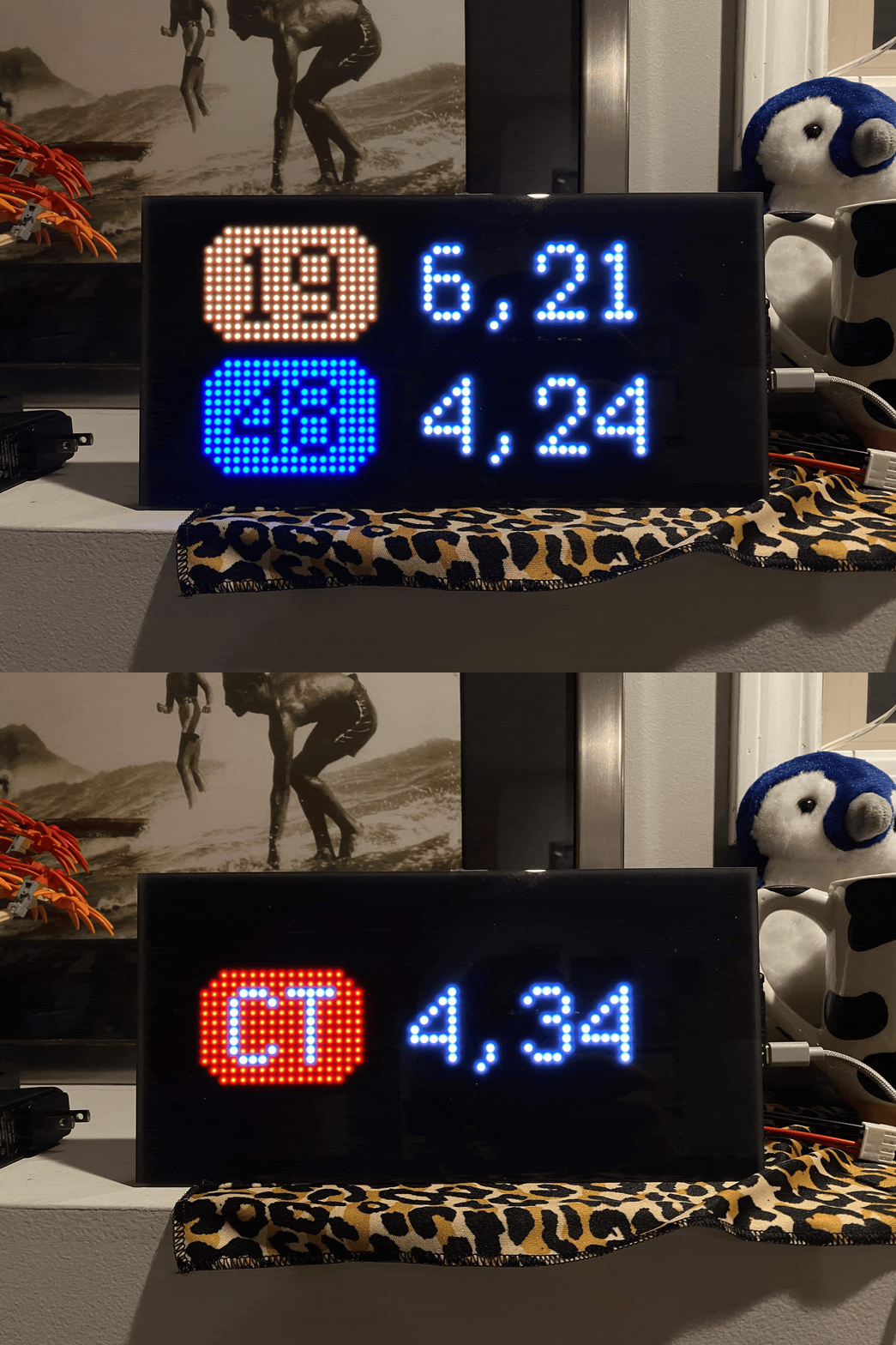
Here’s the code- good luck! One day I will get around to making this readable / workable.
Full Code
Import / Set Up
The set-up / importing is below. This should be in the code.
from os import getenv
import json
import gc
import adafruit_requests
import adafruit_connection_manager
import alarm
import board
import time
import displayio
import busio
import terminalio
import rgbmatrix
import framebufferio
import zlib
from adafruit_display_text.label import Label
from adafruit_matrixportal.network import Network
from adafruit_bitmap_font import bitmap_font
from adafruit_display_shapes.roundrect import RoundRect
from adafruit_esp32spi import adafruit_esp32spi
from digitalio import DigitalInOut

# Get wifi details and more from a settings.toml file
# tokens used by this Demo: CIRCUITPY_WIFI_SSID, CIRCUITPY_WIFI_PASSWORD
ssid = getenv("CIRCUITPY_WIFI_SSID")
password = getenv("CIRCUITPY_WIFI_PASSWORD")
api_key = getenv("transit_api_key")

esp32_cs = DigitalInOut(board.ESP_CS)
esp32_ready = DigitalInOut(board.ESP_BUSY)
esp32_reset = DigitalInOut(board.ESP_RESET)

spi = busio.SPI(board.SCK, board.MOSI, board.MISO)
esp = adafruit_esp32spi.ESP_SPIcontrol(spi, esp32_cs, esp32_ready, esp32_reset)

pool = adafruit_connection_manager.get_radio_socketpool(esp)
ssl_context = adafruit_connection_manager.get_radio_ssl_context(esp)
requests = adafruit_requests.Session(pool, ssl_context)

# ===== DRAWING STUFF =====

displayio.release_displays()
matrix = rgbmatrix.RGBMatrix(
    width=64, bit_depth=4,
    rgb_pins=[
        board.MTX_R1,
        board.MTX_G1,
        board.MTX_B1,
        board.MTX_R2,
        board.MTX_G2,
        board.MTX_B2
    ],
    addr_pins=[
        board.MTX_ADDRA,
        board.MTX_ADDRB,
        board.MTX_ADDRC,
        board.MTX_ADDRD
    ],
    clock_pin=board.MTX_CLK,
    latch_pin=board.MTX_LAT,
    output_enable_pin=board.MTX_OE
)
display = framebufferio.FramebufferDisplay(matrix)

group = displayio.Group()  # Create a Group
bitmap = displayio.Bitmap(64, 32, 2)  # Create a bitmap object,width, height, bit depth
color = displayio.Palette(color_count=5)  # Create a color palette
color[0] = 0x000000  # black
color[1] = 0xFFFFFF  # white
color[2] = 0xFF4400  # muni 19 orange FF4400
color[3] = 0x0024C2  # muni 48 blue
color[4] = 0xE80000  # caltrain red
## You can update these colors to whatever you'd like! This is specific to me.

# Create a TileGrid using the Bitmap and Palette
tile_grid = displayio.TileGrid(bitmap, pixel_shader=color)
group.append(tile_grid)  # Add the TileGrid to the Group
display.root_group = group
The drawing / display elements are below. This will differ depending on what you want to display, but my use case is here as an example.
# The display groups
muni_group = displayio.Group(x=0, y=0)
ct_group = displayio.Group(x=0, y=0)

# 19 Display
muni_19_box = RoundRect(0, 0, 18, 12, 3, fill=color[2], stroke=0)
muni_19_box.x = 6
muni_19_box.y = 3
muni_group.append(muni_19_box)

muni_19_label = Label(terminalio.FONT, text="19", color=color[0])
muni_19_label.x = 9
muni_19_label.y = 9
muni_group.append(muni_19_label)

eta_19_label = Label(terminalio.FONT, text="---", color=color[1])
eta_19_label.x = 29
eta_19_label.y = 9
muni_group.append(eta_19_label)

# 48 Display
muni_48_box = RoundRect(0, 0, 18, 12, 3, fill=color[3], stroke=0)
muni_48_box.x = 6
muni_48_box.y = 17
muni_group.append(muni_48_box)

muni_48_label = Label(terminalio.FONT, text="48", color=color[0])
muni_48_label.x = 9
muni_48_label.y = 23
muni_group.append(muni_48_label)

eta_48_label = Label(terminalio.FONT, text="---", color=color[1])
eta_48_label.x = 29
eta_48_label.y = 23
muni_group.append(eta_48_label)

# CT Display
ct_box = RoundRect(0, 0, 17, 12, 3, fill=color[4], stroke=0)
ct_box.x = 6
ct_box.y = 10
ct_group.append(ct_box)

ct_label = Label(terminalio.FONT, text="CT", color=color[1])
ct_label.x = 9
ct_label.y = 16
ct_group.append(ct_label)

eta_ct_label = Label(terminalio.FONT, text="---", color=color[1])
eta_ct_label.x = 28
eta_ct_label.y = 16
ct_group.append(eta_ct_label)

group.append(muni_group)
muni_group.hidden = True
group.append(ct_group)
ct_group.hidden = True

# ==============

eta_list_19 = []
eta_list_48 = []
muni_time = 0

ct_list = []

# ==============
This is the method to call the API to get transit times.
# Make call to 511 API using "agency" and "stopCode", in this program, SF MUNI / CalTrain
def call_Transit(agency, stopCode):
    gc.collect()

    try:
        with requests.get("http://api.511.org/transit/StopMonitoring?&format=JSON&agency={}&stopCode={}&api_key={}".format(agency, stopCode, api_key)) as response:
            gc.collect()
            print("MEM pre CALL: ",gc.mem_free())
            response_data = json.loads(zlib.decompress(response.content,31)[3:].decode("utf-8"))
            print("MEM post CALL: ",gc.mem_free())
            gc.collect()
            response.close()

            return response_data
    except OSError as error:
        print(error)

# Changing UTC time to Pacific Time
def time_Handling(t):
    gc.collect()

    yr = int(t[0:4])
    mon = int(t[5:7])
    day = int(t[8:10])
    hr = int(t[11:13])

    if hr - 7 >= 0:
        hr = hr - 7
    else:
        hr = hr + 17
        if day - 1 >= 1:
            day = day - 1
        else:
            if mon - 1 >= 1:
                mon = mon - 1
                if mon in [1, 3, 5, 7, 8, 10, 12]:
                    day = 31
                else:
                    day = 30
            else:
                mon = 12
                day = 31
                yr = yr - 1
    return time.struct_time((yr, mon, day, hr, int(t[14:16]), int(t[17:-1]), -1, -1, -1))

def get_MUNI_Times():
    gc.collect()
    try:
        muni_data = call_Transit("SF", "15227")
    except:
        alarm.exit_and_deep_sleep_until_alarms( alarm.time.TimeAlarm(monotonic_time=time.monotonic() + 30) )
    gc.collect()
    muni_response_t = time_Handling(muni_data["ServiceDelivery"]["ResponseTimestamp"])

    for bus in muni_data["ServiceDelivery"]["StopMonitoringDelivery"]["MonitoredStopVisit"]:
        line = bus["MonitoredVehicleJourney"]["LineRef"]
        if line == "19":
            arr_t = time_Handling(bus["MonitoredVehicleJourney"]["MonitoredCall"]["ExpectedArrivalTime"])
            eta = time.mktime(arr_t) - time.mktime(muni_response_t)
            eta_list_19.append(int(eta/60))

        if line == "48":
            arr_t = time_Handling(bus["MonitoredVehicleJourney"]["MonitoredCall"]["ExpectedArrivalTime"])
            eta = time.mktime(arr_t) - time.mktime(muni_response_t)
            eta_list_48.append(int(eta/60))

    del muni_data
    gc.collect()

    return eta_list_19, eta_list_48, muni_response_t

def get_CT_Times():
    gc.collect()
    try:
        ct_data = call_Transit("CT", "70022")
    except:
        alarm.exit_and_deep_sleep_until_alarms( alarm.time.TimeAlarm(monotonic_time=time.monotonic() + 30) )
    gc.collect()
    ct_response_t = time_Handling(ct_data["ServiceDelivery"]["ResponseTimestamp"])

    for train in ct_data["ServiceDelivery"]["StopMonitoringDelivery"]["MonitoredStopVisit"]:
        line = train["MonitoredVehicleJourney"]["LineRef"]
        arr_t = time_Handling(train["MonitoredVehicleJourney"]["MonitoredCall"]["ExpectedArrivalTime"])
        eta = time.mktime(arr_t) - time.mktime(ct_response_t)
        ct_list.append(int(eta/60))

    del ct_data
    gc.collect()

    return ct_list

def display_Transit_Time(eta_list, **kwargs):
    gc.collect()

    offset = kwargs.get("offset", 0)
    new_eta = []
    display_str = "---"

    # print(eta_list)

    if len(eta_list) != 0:
        if offset != 0:
            for t in eta_list:
                if t > 0 and t < 60:
                    new_eta.append(int(t - offset/60))
        else:
            for t in eta_list:
                if t > 0 and t < 60:
                    new_eta.append(t)

        if len(new_eta) > 2:
            new_eta = new_eta[0:2]

        display_str = ",".join(map(str, new_eta))

        if len(display_str) > 8:
            display_str = display_str[0:-3]

        del new_eta
        del offset
        gc.collect()

        return display_str
    else:
        return "---"
The main loop starts here:
while True:
    # Connecting to Wifi
    while not esp.is_connected:
        try:
            esp.connect_AP(ssid, password)
        except OSError as e:
            print("could not connect to AP, retrying: ", e)
            time.sleep(60)
            continue

    gc.collect()
    muni_19_data, muni_48_data, muni_time = get_MUNI_Times()
    gc.collect()
    ct_data = get_CT_Times()
    gc.collect()
    print(muni_time.tm_hour)

    eta_19_label.text = display_Transit_Time(muni_19_data)
    eta_48_label.text = display_Transit_Time(muni_48_data)
    eta_ct_label.text = display_Transit_Time(ct_data)
    gc.collect()

    muni_group.hidden = False
    ct_group.hidden = True

    time.sleep(10)

    muni_group.hidden = True
    ct_group.hidden = False

    time.sleep(10)

    waiting_offset = 20
    while waiting_offset < 101:
        gc.collect()
        eta_19_label.text = display_Transit_Time(muni_19_data, offset=waiting_offset)
        eta_48_label.text = display_Transit_Time(muni_48_data, offset=waiting_offset)
        eta_ct_label.text = display_Transit_Time(ct_data, offset=waiting_offset)
        gc.collect()

        muni_group.hidden = False
        ct_group.hidden = True

        time.sleep(10)

        muni_group.hidden = True
        ct_group.hidden = False

        time.sleep(10)

        waiting_offset += 20

    gc.collect()
Leave a comment